PC Monitor Card — Home Assistant card
A Lovelace card for Home Assistant that shows all the measurements of a computer or NAS at a glance.
Available on request. This card is not published on HACS, but you can get it: write to me to ask for it. Request this card
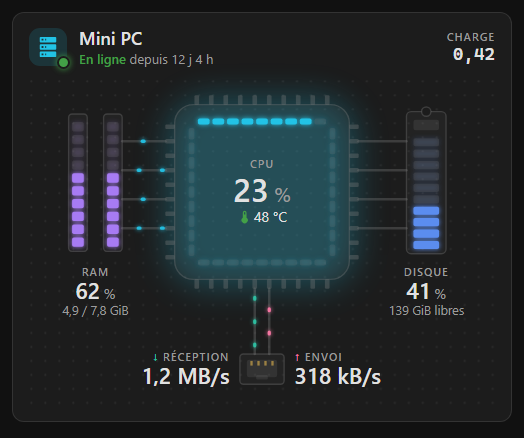
Overview
PC Monitor Card gathers the state of a computer or a NAS on one card: processor and its temperature, memory, disk, network and uptime. The sensors are found automatically from the System Monitor integration, or from the QNAP integration for a NAS.
Three styles to choose from: a motherboard with an animated diagram, a monitor with live charts, or a 24-hour dial. On a NAS, each drive bay shows its SMART status light and its temperature.
Features
- Automatic sensor detection (System Monitor or QNAP NAS)
- Three styles: animated motherboard, monitor with charts, 24-hour dial
- Processor, temperature, memory, disk, network and uptime
- NAS drive bays: SMART status and temperature of each drive
- NAS status badge when the system reports a problem
- Adjustable alert thresholds for processor, temperature, memory, disk and bays
- Visual editor, dark and light themes, French and English
Configuration
type: custom:pc-monitor-card
style: carte
Options
| Option | Type | Default | Description |
|---|---|---|---|
name | string | Displayed name; empty: the device's name | |
icon | string | mdi:server | Header icon (mdi:nas for a NAS) |
device | string | Monitored device. Empty: System Monitor, else the first QNAP NAS | |
style | string | carte | carte (animated motherboard), moniteur (live charts) or cadran (24-hour dial) |
hours | number | 1 | Chart span of the moniteur style, in hours (1 to 24) |
entities | object | Sensors to force (cpu, temperature, memory, disk, net_in, net_out, last_boot…); empty: automatic detection | |
interface | string | Network interface; empty: the busiest one | |
mount_point | string | Monitored disk (mount point or volume); empty: root, or the largest NAS volume | |
cpu_warn / cpu_crit | number | 70 / 90 | Processor thresholds (%) |
temp_warn / temp_crit | number | 70 / 85 | Processor temperature thresholds |
memory_warn / memory_crit | number | 80 / 92 | Memory thresholds (%) |
disk_warn / disk_crit | number | 80 / 90 | Disk thresholds (%) |
drive_warn / drive_crit | number | 45 / 55 | NAS drive bay temperature thresholds (°C) |
drives | boolean | true | Show the NAS drive bays |
animation | boolean | true | Card animations |
FAQ
Which integrations does PC Monitor Card use?
Home Assistant's System Monitor integration for a computer, and the QNAP integration for a NAS. Sensors are recognised automatically, whatever the language of their names.
Does it work with a NAS?
Yes, with a QNAP NAS: processor, memory, volume, network, system status and one bay per drive (SMART status and temperature). Note that QNAP disables throughput, sizes, CPU temperature and uptime by default: enable these entities in Home Assistant.
Which styles does the card offer?
Three: motherboard with an animated diagram, monitor with live charts, and a 24-hour dial.
When will it be available?
It is being finished. It will be published on GitHub and installable with HACS; this page will be updated when it is released.