Aspiration — VST3 effect
VST3 transition effect: during the build-up it transforms the track itself; at the drop, the sound comes back clean at once.
In development. This plugin is not finished yet. Here is what it already does; write to me to be told when it is out. Get notified when it is out
Overview
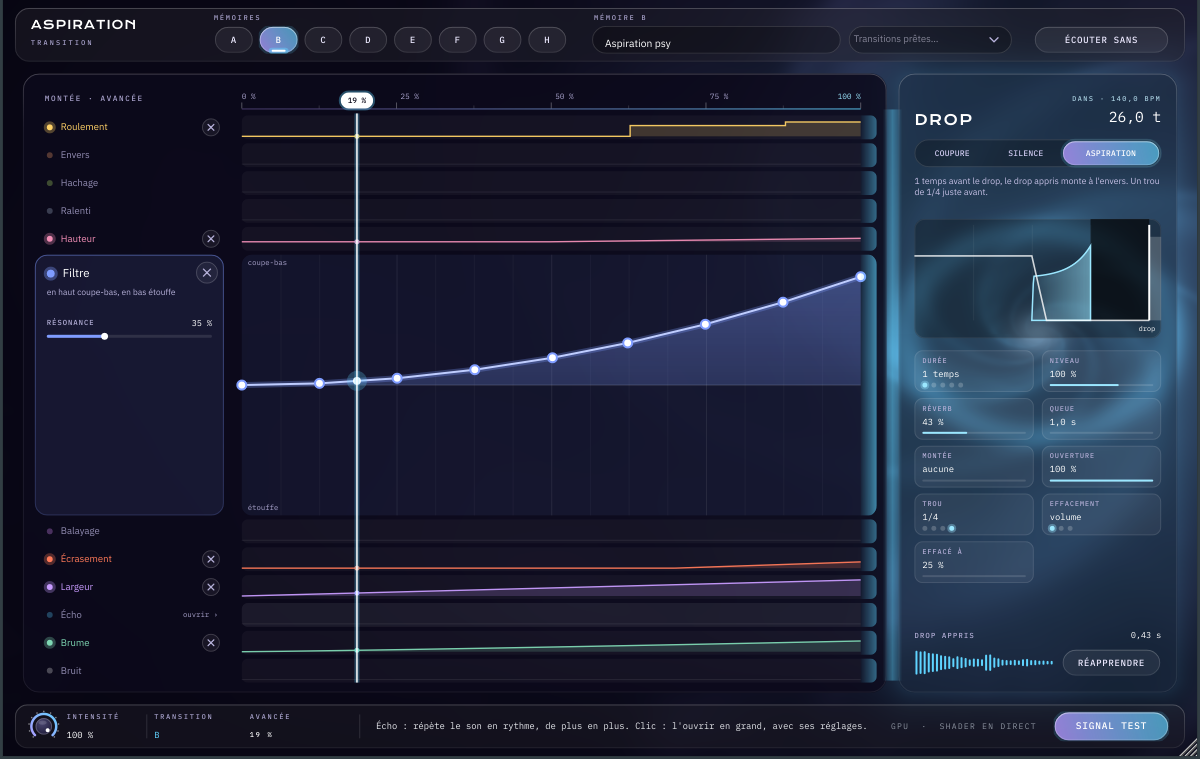
Aspiration goes as an insert on a group or on the master. During a build-up it transforms the track itself — roll, reverse, chop, slow-down, pitch, filter, sweep, crush, width, echo, haze, noise — following curves you draw over the length of the transition. At the drop everything stops and the sound comes back clean.
Each effect has its own lane and point curve. The Drop zone chooses the ending: a hard cut, a silence, or the aspiration, where the learned drop rises backwards just before it hits. Eight memories (A to H) keep ready-made transitions.
The engine is light: all twelve effects at full cost about 1% of one CPU core.
Features
- Twelve effects on the track's own sound: roll, reverse, chop, slow-down, pitch, filter, sweep, crush, width, echo, haze, noise
- One point curve per effect, drawn over the length of the build-up
- Three drop endings: cut, silence, or aspiration of the learned drop played backwards
- Aspiration settings: length, level, reverb, tail, rise, gap, fade
- Eight transition memories (A to H) and ready-made transitions
- Locked to Cubase's tempo and position, resumes correctly mid build-up
- One-click listen without the effect, test signal in the Standalone
Specifications
| Type | Effect |
|---|---|
| Format | VST3 · Standalone |
| System | Windows 10/11 (64 bits) |
| Tested with | Cubase 15 |
| Effects | 12 |
| Memories | 8 (A to H) |
| CPU load | ≈ 1% of one core, everything at full |
| Insert | group or master |
FAQ
Where do I insert it in Cubase?
As an insert on the group that receives the tracks to transform, or on the Stereo Out for the whole track. It follows Cubase's tempo and position; playback started mid build-up picks up at the right place.
Does it add riser sounds?
No: it transforms the track's own sound. That is what makes the transition belong to the track, rather than a sound effect laid on top.
Does it run on a Mac, or in a DAW other than Cubase?
It is built for Windows 10 and 11 (64-bit VST3); there is no Mac version for now. It is a standard VST3, developed and tested in Cubase 15: other VST3 hosts should load it, with no guarantee.
How do I get it?
The “Request this plugin” button opens the contact form, already filled in. I reply with the .vst3 file to copy into C:\Program Files\Common Files\VST3.